
Hey folks, it’s your friendly neighborhood UX designer here in Topeka, Kansas—where the wind blows harder than most service handoffs. I’ve spent years knee-deep in customer journeys, sticky notes, and the occasional existential crisis at 2 a.m. wondering why that “simple” process redesign still feels like herding caffeinated cats.
Then in my Master's program at Boise State (Go Broncos!) I stumbled on Thomas Gilbert’s Behavior Engineering Model from the ‘70s (yes, the guy who basically invented human performance tech before it was cool). And holy service blueprint, Batman—it maps perfectly onto service design. Suddenly everything clicked: why some interventions feel like permanent magic while others are just expensive band-aids that keep falling off.
Gilbert didn’t mess around. He built a 2×3 matrix that screams: Fix the environment first. It’s cheaper, faster, and actually sticks. Only then do you tweak the humans (because let’s be honest, people are squishy and forgetful).
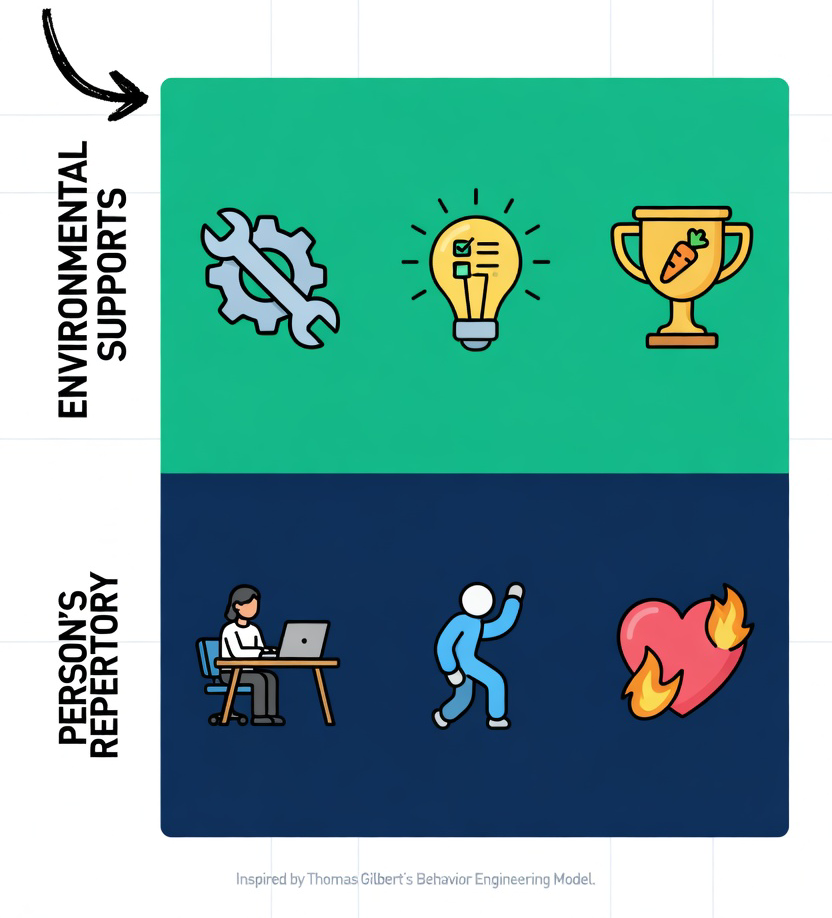
Here’s the original Gilbert quick-hit for context (no PhD required):
Environmental Supports (the “system” side – do this first!)
- Information: Clear expectations, feedback, guides.
- Instrumentation: Tools, processes, resources.
- Incentives: Rewards, consequences, carrots/sticks.
Person’s Repertory (the “human” side – use sparingly)
- Knowledge/Skills: Training, education.
- Capacity: Ability, selection, physical/mental fit.
- Motivation: Intrinsic drive, attitudes.
Gilbert’s big mic-drop: Most organizations obsess over training (the sexy, visible fix) when the real problem is a broken system yelling “I’m not designed for this!” at everyone.
So I did what any self-respecting UX nerd would do: I stole it, re-skinned it for service design, and turned it into The Service Design Intervention Matrix—my love letter to Gilbert with a side of snark.
The Service Design Intervention Matrix
(Or: “How to Stop Training People to Swim Upstream”)
I kept the six boxes but translated them into the language we actually use in workshops, stakeholder decks, and late-night Slack rants. Each category includes when it’s the best option (context + criteria) and a real-world “don’t be that guy” example.
1. Information Interventions (Environmental)
What it is: Redesign how expectations, feedback, and guidance flow through the service—dashboards, signage, error messages, journey maps that actually get used. Best when: Confusion is the enemy and you want permanent clarity for every future employee and customer. Cheap, instant ROI, zero retraining. Example: Instead of teaching baristas to “read the customer’s mind,” you redesign the POS system with one-tap modifiers and visual cues. Boom—fewer wrong orders forever. Pro tip: If your service blueprint has more question marks than arrows, start here.
2. Instrumentation Interventions (Environmental)
What it is: The big guns—process redesign, tool/tech upgrades, automation, physical space tweaks, API overhauls. Permanent structural changes. Best when: The workflow itself is the bottleneck and you need scalable, lasting efficiency. Ideal for high-volume services or when growth is killing you. Example: Airlines that keep training gate agents on “how to calm angry passengers” vs. the ones that redesign boarding with digital queuing and clear signage. One costs salaries; the other costs a one-time dev sprint. Pro tip: This is your “permanent change in the system” hero. Prioritize it over training 9 times out of 10.
3. Incentive Interventions (Environmental)
What it is: Rewire what gets rewarded—KPIs, bonuses, recognition systems, policy nudges, service-level agreements. Best when: People know what to do but have zero reason to care (or are actively punished for doing the right thing). Example: Call centers that stop measuring “average handle time” (which rewards hanging up on grandma) and start measuring “customer delight score.” Suddenly agents become humans again. Pro tip: Incentives are the silent killers of great service design. Fix them early or watch your fancy new journey map collect dust.
4. Knowledge/Skills Interventions (Individual)
What it is: Classic training, workshops, job aids, e-learning, onboarding playbooks. Best when: The system is already solid and there’s a genuine skill gap (new tech, new regulations, highly specialized roles). Use as a supplement, never the main dish. Example: Only after you’ve fixed the clunky CRM do you train reps on its advanced features. Otherwise you’re just teaching them how to lose slowly. Pro tip: Training feels productive. It’s also the most expensive way to paper over bad design. Gilbert is side-eyeing you right now.
5. Capacity Interventions (Individual)
What it is: Hiring the right humans, adjusting workloads, ergonomic setups, accessibility tweaks, role redesign. Best when: The people literally can’t physically or mentally keep up (burnout city, wrong skill mix, accessibility fails). Example: Instead of “more training” for overwhelmed nurses, redesign shifts and add AI triage tools. Capacity first, compassion second. Pro tip: Great for mature services where the system is good but the humans are maxed out.
6. Motivation Interventions (Individual)
What it is: Culture work, purpose storytelling, recognition programs, psychological safety initiatives. Best when: Everything else is fixed and people still don’t want to deliver great service (rare, but it happens). Example: Only after the tools, incentives, and processes are delightful do you run the “find your why” offsite. Otherwise it’s just corporate karaoke. Pro tip: Motivation is the cherry on top. You can’t sprinkle it on a broken sundae and call it gourmet.
The Golden Rule (Steal This for Your Next Deck)
Start left to right, top to bottom. Nail the three environmental boxes first. They deliver permanent, organization-wide wins at lower cost and drama. Only then dip into the individual side—and even then, treat them like seasoning, not the main course.
I’ve watched this model save projects that were circling the drain. Companies ready to blow $250k on enterprise-wide training could instead spenf $40k redesigning two core processes and one incentive rule instead. Training budget? Slashed to $15k for a quick job-aid refresh. Results? Measurable and sticky, with no ongoing costs.
So next time your stakeholder says “We just need better training,” channel your inner Gilbert and reply: “Cool story. But have we looked at the rest of the journey?”
When you change things, people will resist. When you change things for the better, people will still resist.
Often, just being better isn't as important to acceptance of a new design as conformity with the conventions in place. Take, for example, the control panel in Windows Vista. Arguably, the configurations and applications are better organized, better labeled and easier to find. Easier, that is, if you haven't already been trained to find them in different areas and under different labels in earlier versions of Windows. There are twice as many controls in the Vista control panel, giving the user more granular control over the settings and configurations. That should be a good thing, right? Not if you are used to finding configurations buried under other objects and have just accepted the fact and moved on. Now you are being asked to relearn where things are and will spend time fumbling around, especially if you have some legacy computers running different versions of Windows. While this reconfiguration will benefit new users, experienced users don't see enough marginal benefit to accept the change gracefully.
This concept should be considered in all design projects. While you might have a better way of doing things, decide if it's enough better to force all of your users to change their mental maps. It's amazing what people can get used to (imagine some of the legacy systems in use today), but unless you can provide compelling reasons to change, people won't. Your choices are to follow conventions, thereby further cementing that design in the minds of the users, shift them radically and force the transition, or introduce the changes gradually through evolution.
One thing is certain. No matter how you make changes, some users will complain. The key is to provide enough benefit that they get over it quickly.
For another perspective, see Gery's Law.
Welcome
to the
Elsblog!
Sometimes I get an idea that won't leave me alone. Whether these ideas are about design patterns, technical development or implementation, archery or science fiction, the elsblog is where I put my ideas and hopefully share them with the world.
I am a passionate advocate for user centered design with more than 30 years of experience. In my current role as Principle Experience Designer for Sun Life (US) based out of the Kansas City office, I am particularly interested in usability and performance centered design in web and mobile applications.
Recent efforts have taken me in the direction of intent-based routing of interactive voice response and the ethical use of AI in interface design.
I work in a long-established organization (160 years old) with an intricate series of acquisitions, mergers, and history in our client-facing and back-end systems. We sometimes get new designers who want to blow away all existing designs and features, to start from a clean slate. While it can be very satisfying to march forward with no boundaries or restrictions, we have to honor the past and remember everything in place was put in place for a reason.
Chesterton’s Fence is a principle that reminds us to look before we leap. To understand before we act. It’s a cautionary reminder to understand why something is the way it is before meddling in change. The principle comes from a parable by G.K. Chesterton.
There exists in such a case a certain institution or law; let us say, for the sake of simplicity, a fence or gate erected across a road. The more modern type of reformer goes gaily up to it and says, “I don’t see the use of this; let us clear it away.” To which the more intelligent type of reformer will do well to answer: “If you don’t see the use of it, I certainly won’t let you clear it away. Go away and think. Then, when you can come back and tell me that you do see the use of it, I may allow you to destroy it.”
In its most concise version, Chesterton’s Fence states the following:
“Do not remove a fence until you know why it was put up in the first place.”
The lesson of Chesterton’s Fence is what already exists likely serves purposes that are not immediately obvious.
Fences don’t appear by accident. They are built by people who planned them and had a reason to believe they would benefit someone. Before we take an ax to a fence, we must first understand the reason behind its existence.
The original reason might not have been a good one, and even if it was, things might have changed, but we need to be aware of it. Otherwise, we risk unleashing unintended consequences that spread like ripples on a pond, causing damage for years.
As simple as Chesterton’s Fence is as a principle, it teaches us an important lesson. Chesterton challenged the common belief that previous generations were foolish. If we fail to respect their judgment and understand their reasoning, we risk creating new, unexpected problems. People rarely do things without a reason, and just because we don’t understand something doesn’t mean it’s pointless.
The point of Chesterton’s fence is not to hold on to the past, but to ensure we understand it before moving forward. We shouldn’t be too quick to dismiss things that seem pointless without first understanding their purpose.
In the end, Chesterton’s Fence is a metaphor for the hard-earned wisdom of the ages. A reminder to understand something before you change it, to respect the past, even if you want to change the future. You don’t need to be a slave to tradition, but you should approach what already exists with humility and curiosity.

In today’s fast-paced digital landscape, users are bombarded with an overwhelming amount of information every second. To cut through the noise, simplicity in UX design is no longer just a trend; it’s a necessity. A user-friendly, minimalist approach not only enhances usability but also ensures your design resonates with users, reducing cognitive overload and promoting positive engagement.
Simplicity, however, is not just about aesthetics. It’s about creating experiences that feel effortless, intuitive, and enjoyable, even when the user is navigating complex systems. When done right, simplicity leads to faster, smoother interactions, leaving users with a sense of satisfaction and accomplishment.
Why Simplicity Matters in UX
-
Improved Usability: A clutter-free interface lets users find what they need without confusion. When elements are minimal yet purposeful, users intuitively know how to engage with them.
-
Reduced Cognitive Load: Users can process information more easily when their attention isn't diverted by unnecessary elements. A simple design guides their focus to what matters most.
-
Enhanced Focus: A clean layout removes distractions, letting users concentrate on the content and tasks at hand—whether it’s reading an article, making a purchase, or booking a flight.
-
Increased Engagement: The joy of using a design that’s both simple and intuitive fosters deeper user satisfaction. A positive experience is more likely to keep them coming back.
-
Faster Loading Times: Simple designs typically require fewer resources, leading to quicker load times. In a world where attention spans are short, faster websites mean happier users.
The Challenges of Simplification
As much as we strive for simplicity, it’s not always easy to achieve. Here are a few common roadblocks:
-
Feature Creep: We often fall into the trap of adding features "just in case." While each feature might serve a purpose, they can clutter an interface and confuse users.
-
Stakeholder Pressure: Clients or internal teams might push for additional design elements that don’t necessarily align with the user’s needs, resulting in a complicated interface.
-
Fear of Empty Space: Many designers worry that white space means a "blank" design, but in reality, it’s the opposite. White space can provide clarity and guide user focus, helping users better process the content.
Tips for Achieving True Simplicity
-
Prioritize Content: Start by identifying the core content and functionality. Everything else is secondary.
-
Embrace White Space: Don’t shy away from empty space. It improves clarity and reduces cognitive load.
-
Limit the Color Palette: Too many colors can overwhelm the senses. Stick to a limited palette that enhances readability and creates visual harmony.
-
Use Simple Typography: Choose fonts that are easy to read and leave enough space between characters to ensure legibility.
-
Simplify Navigation: Users should never have to search for how to move forward. Keep navigation simple and intuitive.
-
Minimize Visual Noise: Avoid unnecessary graphics or animations that distract the user from the task at hand.
-
Focus on Functionality: Every element should serve a clear, purposeful function. If something doesn’t contribute to the experience, it has to go.
-
Iterate Based on Feedback: Regular testing and feedback ensure that the design is continuously improving, keeping simplicity at its core.
Conclusion: Less is More
Simplicity in UX design isn’t about stripping away creativity; it’s about removing the barriers between users and their goals. The most effective designs are those that seem effortless, guiding users naturally toward their destination with as few steps as possible. By embracing simplicity, we not only create better designs, but we foster positive, meaningful experiences that keep users engaged and satisfied. After all, the art of simplicity is not about what you add to a design—but what you choose to leave out.